



Logging in to uStore Back Office
The uStore installation automatically creates a user that is assigned to the Superuser Root User Group with full read/write permissions.
To log in as the Superuser and start setting up your system:
1. Go to a URL of the following form:
http://<uStore Server address>/uStoreAdmin (for example http://www.printer.com/uStoreAdmin).
 If you are accessing your server locally, you can use the following
address: http://localhost/uStoreAdmin.
If you are accessing your server locally, you can use the following
address: http://localhost/uStoreAdmin.
The following Login page is displayed:
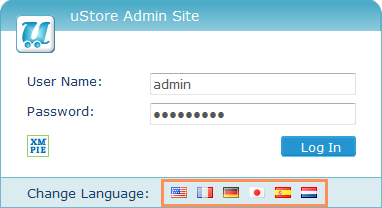
2. Click a flag icon in the Change Language bar to choose the uStore Back Office locale as reflected in system messages, labels, menu items, etc. Please note that in this page you select the application locale. The setup language for each store is defined separately per store.
3. Provide the following authentication details:
● User Name: admin
● Password: admin
4. Click Log In.