



Creating a New Message Template SQL
The SQL queries are used to retrieve data for the message.
SQL queries are used to generate XML code that is, in turn, used by the XSL to create a message in HTML format.
To create a new message template SQL:
1. Click the Presets view.
2. Click the System Setup link.
3. Click the Message Template SQL link.
The Message
Template SQL page is displayed.
4. Click Add New.
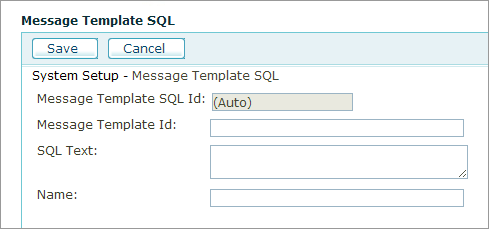
5. Fill the following fields:
● Message Template Id: ID number of the message template with which this SQL is associated.
● SQL Text: SQL statement. The SQL may use parameters as specified in SQL Examples.
● Name: A unique name for the record set that will be fetched.
See Also
Sample of the XML Data Retrieved from Database