



Defining Currencies
The Currency Setup enables you to define currencies that can be displayed in the store and their exchange rates.
A reference currency which serves as a basis for conversion is set by default to US dollar. The administrator can modify the reference currency at any time. The reference currency does not have to be in used in a store. It can only serve as a basis for calculation of the exchange rates of other currencies.
You can add new currencies, edit existing ones and delete all currencies except the reference currency.
To view all currencies:
● In the Presets view,
click the Currency Setup link.
A list of all currently defined currencies is displayed in the List
of Currencies page.
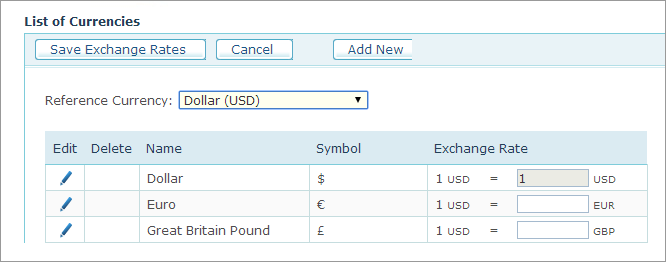
For each currency, the following parameters are displayed:
|
Field |
Description |
|
Name |
Name of the currency. |
|
Symbol |
Currency symbol, for example $ for US dollar. |
|
Exchange Rate |
Exchange rate with respect to the currency set as reference in the Reference Currency list. Changing the reference currency will reset all exchange rates. The reference currency exchange rate will always be "1" and disabled (1 USD=1 USD). The exchange rates can be left empty. |
To define a new currency:
1. On the List of Currencies page, click the Add New
button.
The Currency Setup
page is displayed.
2. Fill in the following information:
● Name: Name of the currency.
● Symbol: Currency symbol, for example $ for US dollar.
● Abbreviation: Abbreviation for the currency name, for example USD for US dollar.
3. Click Save.