



Localizing System Tables
For each language in uStore, you can localize the uStore tables.
To localize system tables:
1. In the Presets view, click Localization.
The Localization
- Culture List
page opens.
2. Click the Translate
 icon
next to a language.
icon
next to a language.
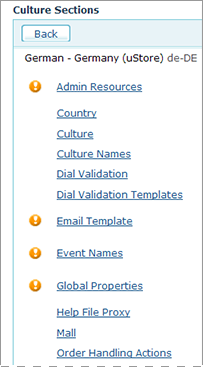
The Culture
Sections page lists all available system tables of the uStore
system that can be localized. The tables that have missing localizations
for some of the text fields will be marked with the  icon.
icon.
3. To localize a table with missing localizations, click
its link.
The localization page
for the selected system table is displayed.
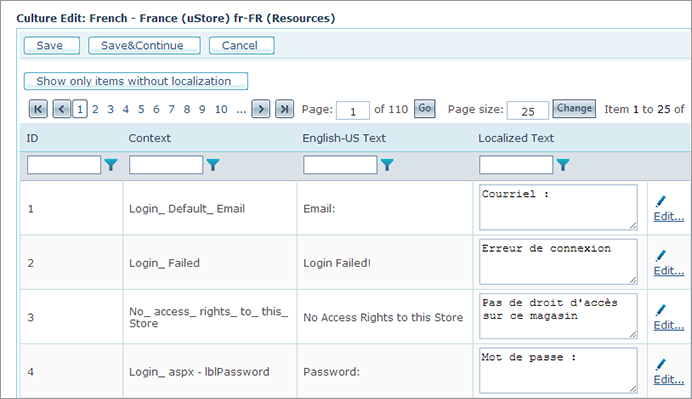
The Culture Edit page lists all text strings that are available for a selected system table, their ID number and an entry field where you can enter text in the local language. That text will be displayed in the store instead of the default English text.
● You can filter down the presented text string list
by using the filtering option at the top of each column. To apply a filter
to the list, click the Filter
 icon next to the required column header and select the filter from the
displayed list. Some filters allow you to further pinpoint the desired
results by specifying a value or a text string of one or more required
fields in the records returned from the database. For example, the "Context"
filter allows you to enter a text string to look for in the listed records.
icon next to the required column header and select the filter from the
displayed list. Some filters allow you to further pinpoint the desired
results by specifying a value or a text string of one or more required
fields in the records returned from the database. For example, the "Context"
filter allows you to enter a text string to look for in the listed records.
● You can sort any column in the resulted record list in ascending or descending order by clicking the required column header. Clicking it once will sort the list in ascending order; clicking it again will sort it in descending order.
● You can display all unlocalized records identified by the [no localization] label in their Localized Text field by clicking the Show only items without localization button.
4. All tables can be localized by simply entering new text in the local language. To do so, click the Edit link to the right of the text string you want to replace and enter the new text in the box that appears. You can also enter the text directly in the Localized Text column.
5. If the record you want to localize contains several localizable fields, click Edit More… to open all the linked localization text fields and localize them as necessary.
 Localization of the Email
Template table works slight differently. For detailed explanations
on how to configure the Email Template table, refer to Setting
Up the uStore Messaging Mechanism.
Localization of the Email
Template table works slight differently. For detailed explanations
on how to configure the Email Template table, refer to Setting
Up the uStore Messaging Mechanism.