



Setting Up the Mall Table
The Mall table defines your uStore
connectivity parameters, including the uProduce connection and the proxy
and SMTP servers details, where applicable. You can also define an alternative
Welcome page for your stores.
The Mall page includes a single
hard-coded table entry that can only be edited. Do not add a new table
entry to this system table or delete this table. View
image

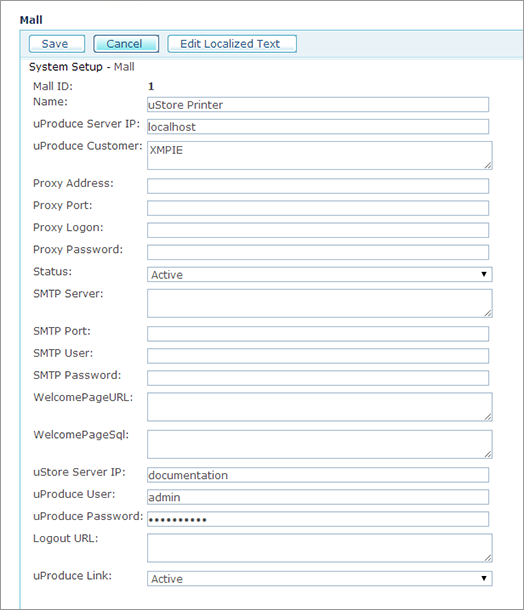
The Mall Table - Edit page includes the following fields:
|
Field |
Description |
|
Name |
Name of the Mall. |
|
uProduce Server IP |
An IP address or a domain name of the uProduce base server. |
|
uProduce Customer |
uProduce Customer Name, to which uStore logs in. |
|
Proxy Address, |
If you use a proxy server, these are the details of the proxy server, behind which uStore is located. Please note that these fields refer to the Proxy Server that acts as an intermediary between a workstation user and the Internet to ensure security, administrative control and caching service. This Proxy Server is not the same as the Helicon Proxy Server. |
|
Status |
Must be set to Active. Setting this selection to Inactive, deactivates uStore. |
|
SMTP Server, |
The details of the server used to send email messages from uStore: ● Email server (required) ● Port (Default: 25) ● User ● Password |
|
WelcomePageURL, |
You can change the default Welcome page of uStore to any other uniquely designed Welcome page. Doing so requires you to enter the new page URL and an SQL select statement. This will be the default Welcome page for all stores in the Mall. |
|
uStore Server IP |
The IP of the uStore server. |
|
Logout URL |
The URL of a page that is displayed after logout. |
|
uProduce link |
Select Active if you wish to display a link to uProduce when clicking the Presets tab. To hide the link to uProduce, select Inactive. |
See Also
Editing the Mall Table Localized Text