



Setting Up uProduce Credentials
In the uProduce Connectivity area you can set up connections to uProduce users. This area also servers as a central location for updating uProduce credentials for all stores associated with a specific uProduce user.
To view/set up uProduce credentials:
1. Enter the Presets view and click the uProduce Connectivity link.
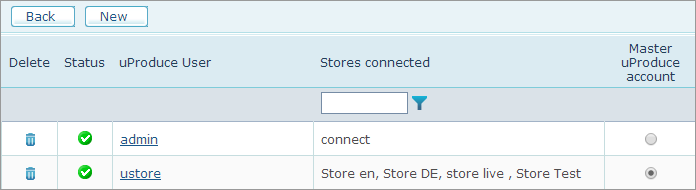
The uProduce Connectivity area displays a list of all connections to uProduce.
 In the Master uProduce account
column you will see that only one option is selected. This will be the
uProduce account that was defined during the uStore setup. Master connection
is used to verify the licensing status of uProduce.
In the Master uProduce account
column you will see that only one option is selected. This will be the
uProduce account that was defined during the uStore setup. Master connection
is used to verify the licensing status of uProduce.
2. To add a new uProduce user, click New.
3. Enter uProduce Username and uProduce Password, and then click Test Connection to check the connection.
4. Click Save.
Notes
● In case the connection with uProduce has been lost, a trigger email will be sent to the administrator.
● In the Stores view, a red indicator next
to a store name  indicates
that a uProduce connectivity problem exists and that the store is offline.
Once the problem is fixed, the store automatically becomes online again
and the icon changes to green
indicates
that a uProduce connectivity problem exists and that the store is offline.
Once the problem is fixed, the store automatically becomes online again
and the icon changes to green  .
.