



Creating a Facebook App
The Facebook App option saves users the process of registration. For example, instead of the user having to register to a store, the user can use the Login with Facebook option, and then all of the user’s registration details are retrieved from Facebook. This eliminates the sometimes lengthy process of registration, which can cause the user to leave the page.
To be able to implement Facebook Login on your store, you first need to create an application in Facebook. When you set up the Facebook login on uStore, you will need the application ID provided by Facebook.
Prerequisites
● Before you create a Facebook app, make sure that you have an account on Facebook.
● If you haven’t registered as a facebook developer, you will be requested to do so once you start creating the app.
To create a new app on Facebook:
1. Log on to Facebook and go to https://developers.facebook.com
2. On the toolbar at the top of the page, click Apps and then Create a New App.
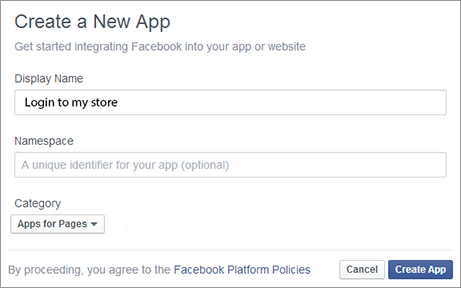
3. Enter a display name for the app, from the Category list choose a Apps for Pages, and then click Create App.
4. In the Security Check window, enter the displayed text and click Submit.
The Dashboard opens. Notice that the App ID appears here. Make a copy of this number for later use.
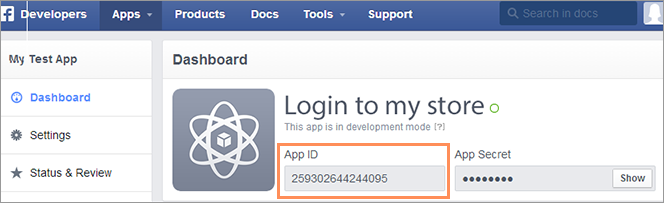
5. On the left panel, click Settings and then do the following:
● In the App Domains box, enter your store’s server domain. Make sure you enter it without WWW.
● In the Contact Email box enter your contact email. This email will be used for important communication about your app.
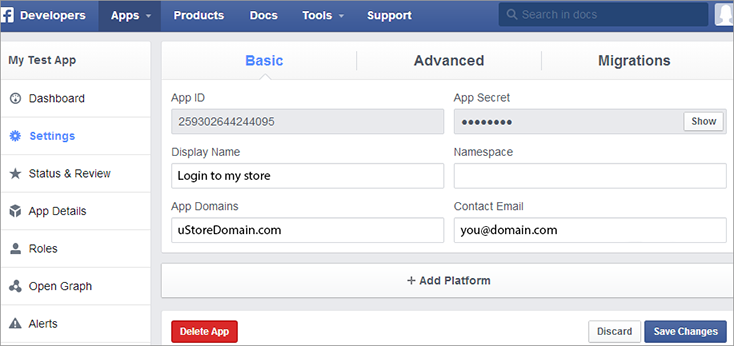
6. Click +Add Platform, and in the Select
Platform window choose Website.
The Website area in the Settings
page appears.
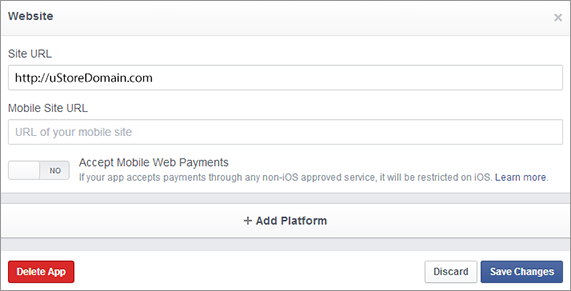
7. In the Site URL box, enter your site’s (store’s) URL. Make sure that you add http:// to the URL address.
8. Click Save Changes.
9. On the left panel, click Status & Review, and when prompted change to ON.