



Store Setup Overview
Setting up and maintaining stores in uStore is done in the Stores view.
Setting up a store involves several steps. Among other parameters, you define the type of store, its appearance, delivery and payment methods. Many of the settings available when you set up a store need to be configured ahead of time. Most of these presets are configured only once and will be available when you set up stores.
The Store list page displays the list of stores with information about each store. Here you can:
● Create new stores from scratch
● Edit store settings
● Edit store content and do management and administration tasks within the store
● Create new stores by duplication
● Delete existing stores
● Localize stores
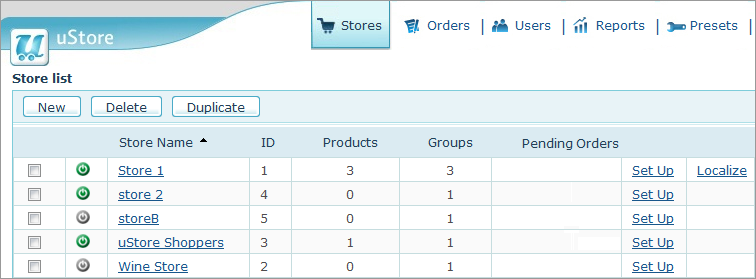
The Store list page displays the following information:
|
Status Indicator |
The
green indicator |
|
Store Name |
The name of the store. |
|
ID |
The store ID. |
|
Products |
The number of products in the store. |
|
Groups |
The number of product groups in the store. |
|
Pending Orders |
The number of pending orders. |
|
Set Up |
Click to open the Store Setup page where you can edit store definitions. |
|
Localize |
Click to localize the dynamic text of your store. |
 indicates
that the store is online. The grey indicator
indicates
that the store is online. The grey indicator  is displayed for offline stores.
  indicates
that a uProduce connectivity problem exists and that the store
is offline. Once the problem is fixed, the store automatically
becomes online again and the icon changes to green.
indicates
that a uProduce connectivity problem exists and that the store
is offline. Once the problem is fixed, the store automatically
becomes online again and the icon changes to green.See Also