



Clearing Model Overview
The uStore Back Office application supports multiple clearing models, enabling the store administrator to select the relevant model for each store. In the Clearing Model page you can configure in advance clearing models that will be available for your stores.
The following is the Clearing Model list:
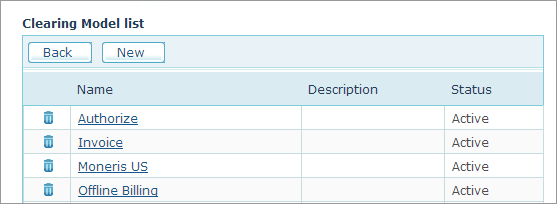
You can use the following clearing models:
● PayPal (PayPal Payflow Pro and PayPal Web Site Payment Standard)
● Moneris
● Ogone
● AuthorizeNET
● MultiSafepay
● Invoice
● Cost Center
● Purchase Order
The clearing models that you choose are then made available to the administrator via the Store Setup page > Clearing tab (see Setting Up the Store Clearing Methods).
The Clearing Model list includes a list of all pre-configured clearing models. The Invoice and Offline Billing clearing models are available by default. Naturally, you can use or modify them as necessary.
Setting up a clearing model involves two steps: choosing a Clearing Model (that is, a clearing service) and selecting the related Data Collection Method. These two selections are correlated; meaning, selecting a clearing method is bound to affect your choice of data collection method.
Available Clearing Models
● Automatic clearing using a clearing house: uStore is supplied with several integrated online clearing houses. These clearing providers enable you to automatically clear transactions using various clearing methods.
● No clearing
Available Data Collection Methods
● Credit card collection: presents the customer with a user interface for the specific clearing method chosen in the Clearing Method drop-down list.
● No collection (Payment via Invoice)
In addition, you can create plug-ins for other clearing models and data collection methods and integrate them in to uStore. The clearing models you add are made available to the administrator via the Store Setup page’s Clearing tab. For more information on creating clearing services plug-ins, refer to the uStore Software Development Kit documentation.
The following table shows the available pairs of Clearing Models and Data Collection Methods:
|
Clearing Method |
Data Collection Method |
Remarks |
|
PayPal Payflow Pro /PayPal Web Site Payment Standard |
Credit Card Collection |
|
|
Moneris Clearing Logic |
Moneris Clearing User Data Credit Card |
|
|
Ogone Redirect Clearing |
Ogone Redirect Clearing |
The following clearing gateways can be used: ● Credit Card ● iDeal ● giroPay ● Direct Debits AT ● Direct Debits DE |
|
AuthorizeNET |
AuthorizeNET Clearing |
Bank transfer is not supported. |
|
MultiSafepay |
MultiSafepay Clearing |
Bank transfer is not supported. |
|
Cost Center Clearing |
Cost Center Clearing |
Using this option, the customer will be able to choose to bill the order to an organization cost center. |
|
Purchase Order Clearing |
Purchase Order Clearing |
Using this option, the customer will be able to choose to perform a payment by issuing a separate purchase order (PO). |
|
No Clearing |
Credit Card Collection |
This model is set up ‘out of the box’ as the Offline Billing model. Administrators can choose not to submit transactions to automatic clearing services but perform the clearing in-house using the customer’s credit card details as provided at ordering time |
|
No Clearing |
No Collection |
This model is set up ‘out of the box’ as the Invoice model. Using this option, customers will not be asked to fill in their credit card details. Instead, credit card collection will take place by phone after ordering time. |
See Also