



Enabling Store-Friendly URL
1. In the General section, select Enable Store-Friendly URL to enable a friendly URL for accessing the store.
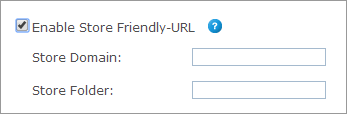
2. Specify the following:
● Store Domain: The domain name of the server on which uStore is installed or the domain name of the Proxy server behind which uStore is located.
● Store Folder (optional): A user-friendly name for the folder containing this store (for example, "MyStore"). The combination of a domain and a folder must be unique for each store.
 Notes
Notes
● When entering only the Store Domain, the Store URL appears as: www.StoreDomain.com
● When entering both the Store Domain and the Folder, the Store URL appears as: www.StoreDomain.com/StoreFolder
● When entering only the Store Domain, make sure this domain is not used for other stores.
● If you are using a proxy server, follow the instructions provided for the Proxy Setup utility after you place the store online.