



Localizing Your Storefront and Back Office
The Localization page in the Presets view displays all cultures defined in the system. These include out-of-the box cultures and additional cultures that have been added.
In the Localization page you can add cultures, and localize the Storefront and Back Office to any language as reflected in system messages, labels, menu items, etc (i.e., static items). The static text is the text that appears /is available in all uStore stores and Back Office.
You can ease the localization process by importing and exporting localizations as Excel sheets.
 You can
also localize dynamic store text (for example, Product Groups,
Products). These localization options are defined in the Stores view and are specific for
each store.
You can
also localize dynamic store text (for example, Product Groups,
Products). These localization options are defined in the Stores view and are specific for
each store.
To view a list of all cultures, in the Presets view click Localization. The Localization - Culture List opens.
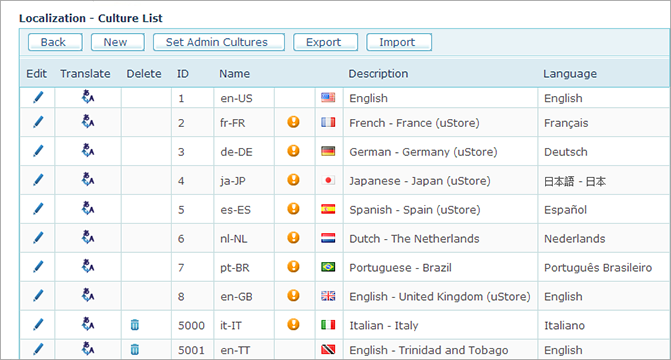
The Culture List
contains all cultures that are currently defined in your uStore system.
The cultures with missing localizations are marked with the  icon. For each culture
a flag, a full culture name (French-France),
a culture code (fr-FR)
and a language name in the native language (Français)
are displayed. Clicking the Edit
icon. For each culture
a flag, a full culture name (French-France),
a culture code (fr-FR)
and a language name in the native language (Français)
are displayed. Clicking the Edit  icon allows you to edit these definitions.
You can add a culture, edit culture properties, translate Storefront and Back Office labels and menus to the selected language and delete a culture. Note that out-of-the box cultures and cultures already used in stores cannot be deleted.
Administrators are able to select the locale they want to use when they log in to uStore Back Office based on the settings you define here. See Setting Back Office Culture.
Store users are able to select the locale they want to use when they log in to the Storefront based on the settings defined when setting up a store. See Adding a Culture.
What do you want to do?
Export and import localizations